In HCDE 451, each week we were tasked with using a different prototyping method each week to create a small project. In one of the final weeks, our topic was to create an interactive wireframe. Choosing from a few options, I decided the topic should be for a pet adoption website. I used Adobe Xd for the first time to complete this assignment, so I wanted to experiment with both breadth and depth in the two wireframes I created.
Mobile Wireframe
I decided to create a wireframe for an app that would work within the iOS design guidelines. I took inspiration from apps like Pinterest and Yelp because they both rely heavily on sorting and filtering features.
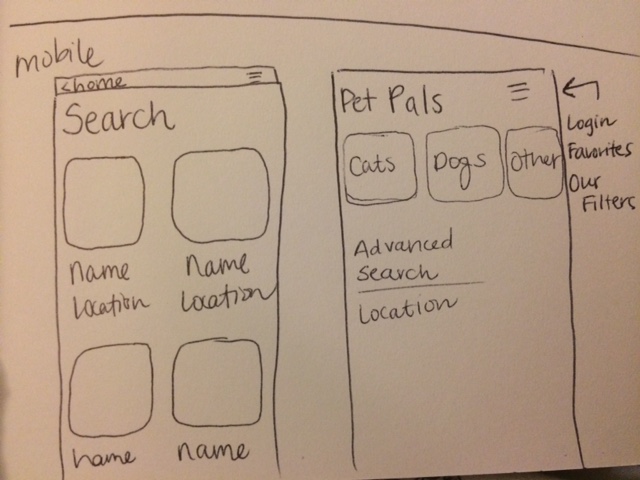
Initial sketches for mobile.
I explored more of designing a wireframe with breadth on the mobile side. Users can use the “animal type” filter buttons, and it surprisingly took me a large amount of time to implement. I think that the breadth is better for presenting a user with an artifact and asking to play around with it, rather than guiding users through a set list of tasks. View the interactive mobile prototype.
Web Wireframe
Designing for web was a bit easier for me because I have experience creating layouts for web. I wanted to create the feeling of friendliness, hence the “Welcome back”. I also wanted the interface to be very photo-focused because the people I talked to about the project said their priority was to look a pictures of dogs.
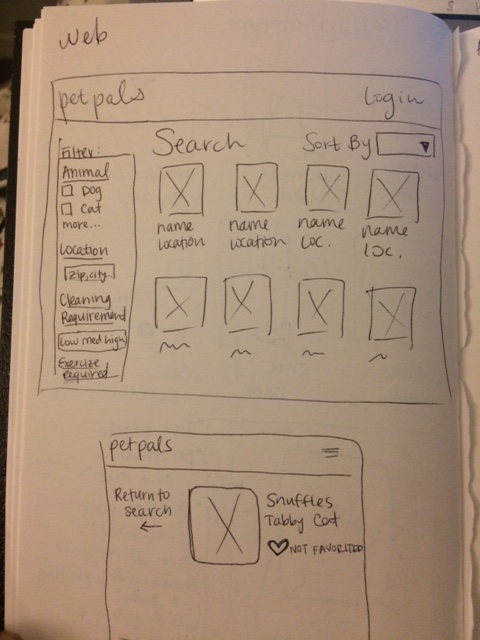
Initial sketches for web.
I created a wireframe that requires a very specific order of interactions. This order is: (1)Click “About Our Filters” (and learn you want a high exercise pet), (2)Click “PetPals”, (3)Click dropdown arrow under exercise, (4)Click “High” in drop down, (5)Click heart icon on first pet listing (top left), (6)Click “Favorites”. This method works well for a rigid user test where a moderator is leading a user through a series of tasks. On future versions of this project, I would like to allow users to choose what they’d like to filter for, then go through the process of selecting any of the images to add to their favorites. Additionally, I would like to be able to combine the web and mobile to show that adding favorites on mobile would show up on the web “Favorites” page. View the interactive web prototype.
User Test
In the user test, I think the icons worked well to indicate how to “favorite” listed pets when promoted. In a second user test, I might ask the user what they thought the heart meant, and if they would still know it’s a “favorite” feature without being prompted. In an extended version of the wireframe, I would also need to consider how the filters work on the page. Would they be anchored to the top or would they remain on their location on the page, so that they disappear when the user scrolls down. Speaking to the user, she requested more pictures of dogs, as well as recommending filters such as age and pet size, because those are two metrics that are important to her.
 Emily Uthoff